THE DUO JOURNAL · OCTOBER 24, 2026
How to choose a natural teleprompter reading speed
The right teleprompter reading speed is the pace at which you can speak clearly, breathe, and finish your thoughts without chasing the script. Measure a short spoken read, use that words-per-minute figure as your starting point, then check it in a recording.
Start with your voice, then move the text.
Do your first read without scrolling. Otherwise, you risk measuring how fast you can keep up with a moving screen rather than how you want to sound. Pick a paragraph similar to your real video: a lesson if you teach, an explanation if you demonstrate products, or a short update if you speak to a team.
- Count the spoken words. Use your script’s word count. Leave out directions you will not say, such as “show the screen.” Spell out a number if you will pronounce it as several words.
- Read aloud and time the whole passage. Include natural breaths and pauses between ideas. Stop timing after the last spoken word.
- Calculate your starting WPM. Multiply the word count by 60, then divide by elapsed seconds.
- Try a second read. If the first was hesitant or unusually rushed, measure again. Choose the delivery you would want a viewer to hear.
For example, 90 words delivered in 45 seconds equals 120 WPM: 90 × 60 ÷ 45. The same passage delivered in 54 seconds equals 100 WPM. Both are valid measurements. The useful question is which read suits your message and sounds comfortable.
Include pauses in this measurement if you want them in the finished take. Counting only the moments when you are actively speaking produces a faster number and leaves less room for those pauses in a continuously scrolling script.
What does WPM mean for a 30-second or one-minute video?
WPM means words per minute. It is a useful estimate for planning script length, provided you remember what the estimate leaves out. These examples use simple arithmetic, not an industry standard or a promised runtime.
| Script length | 100 WPM | 120 WPM | 140 WPM |
|---|---|---|---|
| 60 words | 36 seconds | 30 seconds | About 26 seconds |
| 120 words | 72 seconds | 60 seconds | About 51 seconds |
| 180 words | 108 seconds | 90 seconds | About 77 seconds |
Estimated seconds = words × 60 ÷ WPM. For a target runtime, reverse the calculation: approximate words = WPM × seconds ÷ 60. At 120 WPM, a 30-second spoken segment has room for roughly 60 words. A countdown, silent product demonstration, or additional pause needs its own time.
If your natural read does not fit the available time, shorten the script before increasing the speed. Removing a repeated sentence often preserves more of your delivery than trying to compress every sentence into a faster performance.
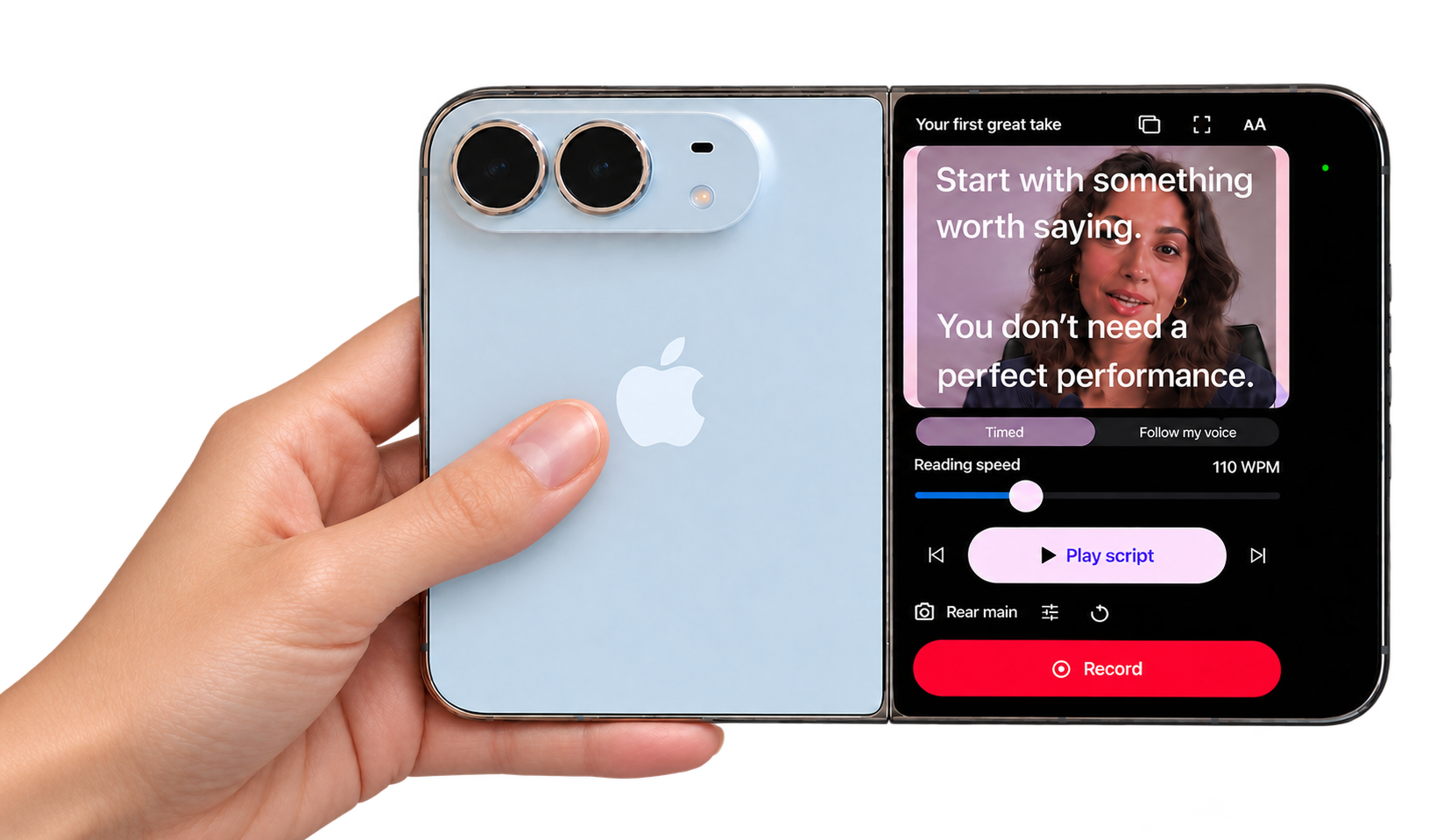
Set your teleprompter reading speed in Teleprompter Duo.
The current app starts with a reading pace of 140 WPM and offers a 60–240 WPM range in steps of five. Those are app settings, not a recommendation that everyone should read at 140 WPM. Your measured pace, vocabulary, and purpose matter more than the default.
- Open your script in the teleprompter and choose Timed.
- Find Reading speed and adjust the slider near your measured pace. If your result falls between settings, try the nearest one and compare a read.
- Choose a readable text size and column width before judging the pace. Keep your recording distance and phone placement consistent.
- Press Play script and rehearse the first paragraph. Use the paragraph controls or Start over to repeat the same section.
- Record a short take and review your sound and delivery. Change one setting at a time so you can tell what helped.
The website reading demo is a quick way to try a moving script before opening the app. Its simplified controls are not the full app interface. For the complete reading and recording setup, use our iPhone Duo teleprompter setup guide.
Try this short rehearsal exercise.
Use the same passage for each attempt rather than changing the script and the speed together. This original practice script has 60 words when counted by spaces. At 120 WPM, the arithmetic gives 30 seconds; at 100 WPM, 36 seconds. Your actual spoken delivery can differ.
Before you press record, take a breath and look at the lens. You do not need to rush through every sentence. Give each idea enough space to land. If a phrase feels awkward, say it again in your own words. The goal is a clear message, a comfortable pace, and a video that sounds like you talking to one person.
Read it aloud once without scrolling and calculate your WPM. Then rehearse it at a nearby setting. Record an attempt only after the words feel readable. On playback, listen for rushed endings and pauses that disappeared. Check whether your gaze moves smoothly or repeatedly darts ahead.
If the script keeps getting ahead of you, lower the setting by one five-WPM step and repeat. If the words feel late, try one step higher. These are small calibration changes, not a rule that the faster take is better.
Why the scroll can feel wrong even at the right WPM.
| What you notice | What to try next |
|---|---|
| Words disappear before you finish. | Lower the timed pace. Check whether your measured read included the pauses you want to keep. |
| You wait for the next sentence. | Try a small speed increase, then reread the same passage to compare. |
| Only one sentence makes you stumble. | Rewrite that sentence, spell out the number, or split a long thought. A global speed change may not solve a local wording problem. |
| Your eyes travel across the display. | Review column width and lens proximity. Faster scrolling does not fix a wide reading layout. |
| You lose your place after a demonstration. | Plan a pause and restart, divide the script into sections, or evaluate supported voice following. |
A WPM value describes word progress, not how quickly a particular line appears to move across the screen. Font size and wrapping change the amount of text you can see. If you change the layout, run another short test rather than assuming the same setting will feel identical.
For a closer look at gaze and placement, follow our guide to more natural teleprompter eye contact. A clear recording depends on both the reading layout and the pace; neither setting guarantees invisible eye movement.
Timed scrolling or voice following?
Timed mode advances at the pace you select. It does not automatically stop at every comma, full stop, or stage direction. That makes it useful for a rehearsed passage, but a long unscripted aside can leave the text ahead of your delivery.
Pro’s Follow my voice option uses supported on-device speech recognition to track your words. Try it when your delivery includes variable pauses, and test it with your actual language, microphone, and script before relying on it. Availability depends on supported recognition and recording configuration; it is not a promise that every ad-lib or skipped paragraph will be followed perfectly.
You can build a comfortable workflow with timed rehearsal first. Compare the actual feature split in our Free vs Pro guide, rather than choosing a plan solely because a mode sounds more advanced.
Common questions about teleprompter speed.
Is 140 WPM the best teleprompter speed?
It is Teleprompter Duo’s current default, not a universal best setting. Measure your own read and compare recordings. A technical explanation and a short introduction may need different pacing.
Will blank lines make timed scrolling pause?
Do not rely on blank lines or punctuation as automatic pause commands. In the current app, timed progress is based on WPM. Use readable paragraph breaks to organize your thoughts, then rehearse any pauses or use the playback controls.
Does a speed number mean the same thing in every app?
No. Check the units. Some apps expose WPM; others use their own speed scale or a duration setting. For example, the Teleprompter Premium+ speed guide documents its own numerical scale, while Teleprompter.com’s FAQ distinguishes several scrolling modes. Do not transfer a slider number between apps without checking what it measures.
Should I speed up a script to meet a time limit?
First calculate the length your comfortable pace allows. Edit repeated ideas, then record another timed read. If a faster take sounds rushed or hides the point, a shorter script is the better adjustment.
Find your pace. Then find your next take.
For a broader app checklist, explore our Duo teleprompter buying guide.
Explore Teleprompter Duo ↗